← Back to blog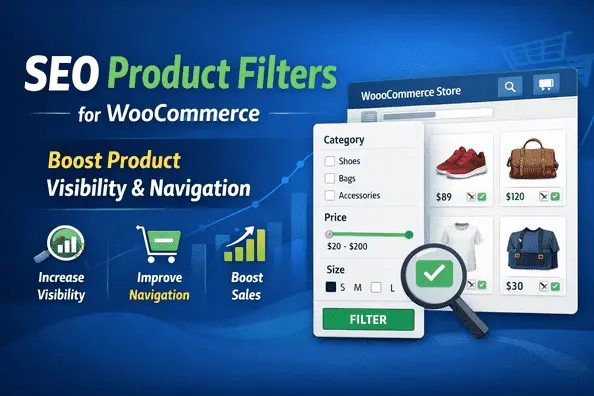
SEO & PerformanceWordPress ServicesWooCommerce
SEO Product Filters for WooCommerce Explained for Better Product Navigation
A
Alex
Dec 27, 2025 · 4 min read
- Introduction
- What Are SEO Product Filters for WooCommerce?
- Why Product Filters Are Important for SEO
- How SEO Product Filters for WooCommerce Improve User Experience
- Types of WooCommerce Product Filters
- SEO Best Practices for SEO Product Filters for WooCommerce
- Common SEO Mistakes with SEO Product Filters for WooCommerce
- Best Plugin – SEO Product Filter for WooCommerce
- How to Install and Configure SEO Product Filter
- SEO Product Filter Pricing & Plans
- My Experience (Pros & Cons)
- Who Should Use This Plugin?
- Final Verdict
- FAQ
Introduction
Running a WooCommerce store with hundreds or thousands of products is not easy. Customers expect fast search results, accurate filtering, and smooth navigation. If your product filters are slow or poorly optimized, users leave without buying, which directly affects conversions and SEO rankings. SEO Product Filters for WooCommerce are essential for online stores that want faster navigation, better user experience, and improved search visibility. Running a WooCommerce store with hundreds or thousands of products is not easy. Customers expect fast search results, accurate filtering, and smooth navigation. If your store lacks SEO Product Filters for WooCommerce, users often leave without buying, which directly affects conversions and Google rankings.What Are SEO Product Filters for WooCommerce?
An SEO Product Filter is a WooCommerce feature or plugin that allows customers to filter products by attributes like price, category, size, color, brand, rating, and more — while keeping URLs search-engine friendly. Unlike default WooCommerce filters, SEO product filters generate clean URLs, indexable pages, and faster AJAX-based filtering.Why Product Filters Are Important for SEO
- Creates indexable category + attribute pages
- Improves crawlability for Google
- Reduces bounce rate
- Improves internal linking
- Targets long-tail keywords automatically
SEO Impact of WooCommerce Product Filters
| Feature | SEO Benefit | User Impact |
|---|---|---|
| Clean Filter URLs | Better indexing in Google | Easy navigation |
| AJAX Filtering | Improves page speed signals | No page reload |
| Attribute Filters | Targets long-tail keywords | Better product discovery |
| Canonical Support | Prevents duplicate content | Cleaner SEO structure |
| Noindex Control | Stops low-value pages indexing | Better crawl efficiency |
How SEO Product Filters for WooCommerce Improve User Experience
User experience is directly linked with SEO. SEO product filters help by:- Instant AJAX filtering (no page reload)
- Faster product discovery
- Reduced search frustration
- Higher conversion rates
Types of WooCommerce Product Filters
- Category Filters
- Price Range Filters
- Attribute Filters (Color, Size, Brand)
- Rating Filters
- Custom Taxonomy Filters
SEO Best Practices for SEO Product Filters for WooCommerce
- Use clean, readable URLs
- Avoid duplicate filter URLs
- Use canonical tags
- Noindex unnecessary filter combinations
- Enable caching
Common SEO Mistakes with SEO Product Filters for WooCommerce
- Allowing infinite crawlable URLs
- No canonical implementation
- Slow filtering performance
- Poor mobile usability
Best Plugin – SEO Product Filter for WooCommerce
The SEO Product Filter for WooCommerce by Premmerce is one of the best solutions available for advanced filtering and SEO optimization.| Feature | Description | SEO Benefit |
|---|---|---|
| SEO-Friendly URLs | Clean structured filter URLs | Better Google rankings |
| AJAX Filtering | No page reload | Improved UX & speed |
| Smart Caching | Stores filter results | Lower server load |
| Compatibility | Works with all major themes | Easy integration |
How to Install and Configure SEO Product Filter
- Download the plugin
- Go to WordPress Dashboard → Plugins → Add New → Upload
- Install & Activate
- Navigate to WooCommerce → Premmerce Filter
- Configure attributes & categories
- Test filters on shop page
SEO Product Filter – Pricing & Plans
| Plan | Price | Includes |
|---|---|---|
| Unlimited Sites | $459.99 / Year | Updates + Expert Support |
| 5 Sites | $179.99 / Year | Updates + Expert Support |
| Single Site | $69.99 / Year | Updates + Expert Support |
My Experience with SEO Product Filter
Pros
- Easy setup
- SEO-friendly URLs
- Fast performance
- Excellent support
Cons
- Limited styling in free version
- Advanced features in premium
Who Should Use This Plugin?
- WooCommerce store owners
- Agencies
- Large product stores
- SEO-focused businesses
Final Verdict
SEO Product Filter for WooCommerce is a must-have plugin for stores that want better SEO visibility, faster navigation, and higher conversions.👉 Buy SEO Product Filter for WooCommerce Premium Now
FAQ
Q1. Is it compatible with all themes? Yes, with most WooCommerce themes.Q2. Free vs Premium? Premium offers advanced SEO features.
Q3. Support? Available via official Premmerce support.
👉Contact Us
👉Trustpilot
Related WooCommerce Tutorials
- How to Add Apple Pay in WooCommerce
- WooCommerce Checkout Error Fix
- WooCommerce Cart Not Updating Fix
- Remove WooCommerce Cart Icon
- WooCommerce Speed Optimization Guide
- WooCommerce Mobile Optimization Tips
Useful Resources
#Seo#WooCommerce
A
Written by
Alex
SOFTIO TECH — web development & website support.